Palette Picker: How to Use an Image and Online Tools to Create a Color Palette
I think you’ll agree that color is a very important aspect of interior décor. For one thing, there are so many options when it comes to deciding on what color scheme you want to use in any given space—from all white to neutrals to primaries… You get the idea. So, how do you start to decide on what colors to use?
One of the ways I approach color for interior design is to find images to inspire the color palette I want to use in a particular room. But sometimes the images by themselves are not enough information for me to actually act on making color selections, and when that happens there are a few online tools I turn to for help. I thought you might want to know about them.
The Project
I have a friend who recently moved from a house he’s been sharing with several roommates to his own condo in downtown Austin. The space he has is mostly glass and concrete—lucky him! — and he’s a big fan of using tons of colors in his décor. We sat down to discuss how to bring color into his space and went through some images so I could get a good idea of what kind of color he likes. We found an image that clicked for him and have used that as our inspiration.
The Inspiration
Design and Image: Shyama Golden
Here’s a space my friend really loves. It is a nice representation of what he’s dealing with in his own space, mainly concrete and windows. What’s terrific about this photo is it is indeed filled with color. However, that makes it somewhat difficult to get a grasp of exactly what colors he’s drawn to. Enter the online tools!
Pictaculous.com
Pictaculous.com is probably the simplest of all the tools I use. You just go to the site, browse on your computer to upload a photo, and your palette is presented. The palettes from the tool itself are sometimes a bit limited—for example, with our inspiration photo it focused only on neutrals, which is no help for this project—but there are also other suggested palettes from two other sources that you can look at as well, which is very helpful.
Palettefx.com
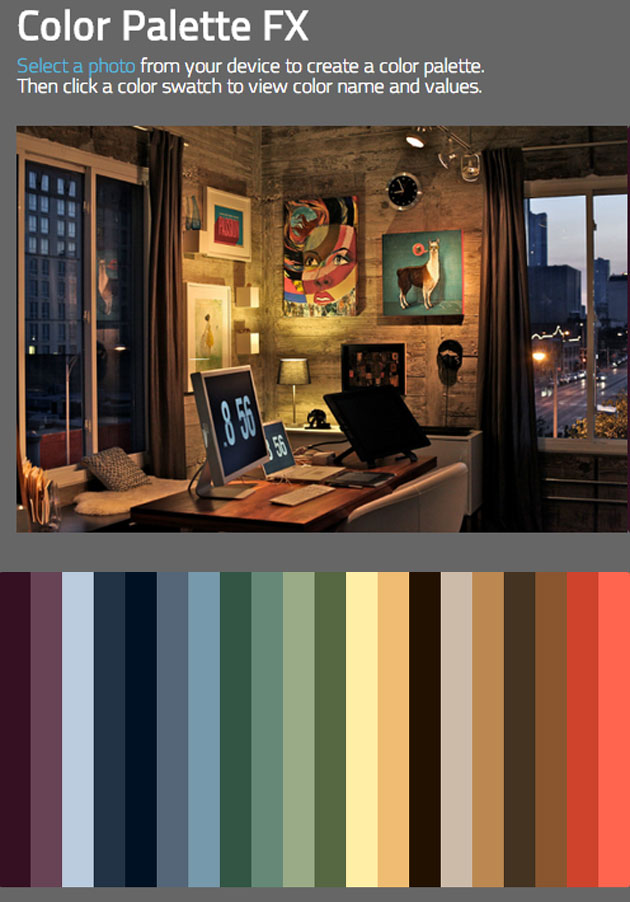
Palettefx.com is also a simple to use tool, and one that provides just about every color within the uploaded image. That’s the kind of result I really like because it then allows me to create a more limited and usable palette by going through these colors with my friend and determining which of them are most appropriate for his space.
Photocopa
I also need to mention Photocopa, which is a tool on the Colourlovers.com website, and is the source of the initial palette image shown at the beginning of this article. While this requires registering a free account on the site in order to use the tool, I find it worthwhile, since the palette tool not only provides a nice range of colors from the initial image but also gives suggested varieties for usage.
Do you have a project that can use the help of an online palette picker?
